

Revolutionizing Classroom Collaboration with Markify
Turning Classrooms into Collaborative Spaces—One Digital Canvas at a Time

Revolutionizing Classroom Collaboration with Markify

Sometimes, you stumble upon a tool that makes you think, "Where has this been all my teaching life?" That’s exactly how I felt when Markify followed me on BlueSky. Naturally, I had to check them out—and I’m glad I did. Markify is a game-changer for classroom collaboration, offering an easy-to-use, shareable whiteboard that takes group work to the next level.
Collaboration Without Chaos
If you've ever tried to get an entire class working on a project together, you know how quickly things can spiral into chaos. Markify solves this problem with its robust sharing settings and temporary editing controls. It allows students to collaborate in real-time while giving teachers the power to manage participation smoothly. No more juggling between devices or trying to get everyone on the same page—literally.
A Quick Look at Markify’s Origins
Markify isn't just another digital whiteboard. It was designed to address the shortcomings of traditional whiteboards and other digital tools by offering a real-time platform where anything written gets streamed directly to students' devices. This means students can always follow along and catch any notes they might have missed.
Powerful Features, Simplified
Markify shines with its balance of simplicity and functionality. Here are some standout features:
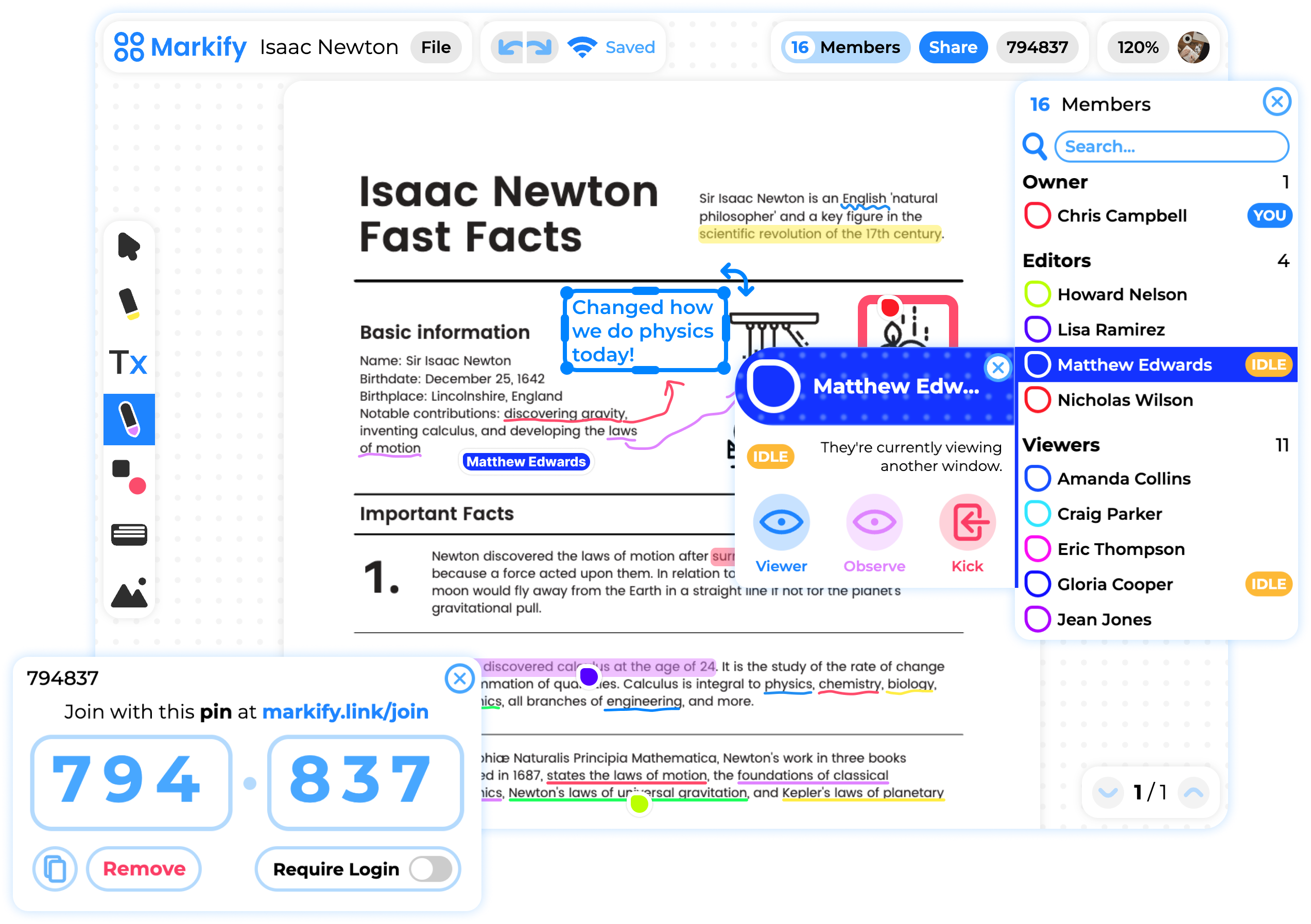
Upload PDFs: Easily upload worksheets or documents for students to view and annotate.
Freeboard: Need more space? Freeboard offers an infinite canvas for brainstorming and expanding ideas.
Share with Pin: Students don’t need to create accounts. Share lessons with a quick pin code—simple and secure.
Real-Time Collaboration: From annotations to member status, everything syncs in real-time. Students stay engaged and connected.
Temporary Editor Access: Give students temporary editing rights when you want them to participate directly in the lesson.
Observe Mode: Keep track of how students are engaging by observing their screen navigation during lessons.
Idle Indicator: Wondering if a student is drifting off-task? The idle indicator lets you know if they’ve switched to another window.
Local Save: If internet issues pop up, Markify automatically saves work locally, so nothing gets lost.
Download as PDF: After a session, anyone can download the lesson as a PDF for later review—no more "I lost my notes!"
Why Markify Works in the Classroom
Markify makes classroom collaboration feel seamless. Students stay engaged because they can interact directly with the content, while teachers maintain control over how and when they participate. It strikes a perfect balance between structure and freedom—exactly what collaborative learning needs.
Plus, Markify is compliant with COPPA and FERPA regulations, so it’s safe for student use.
Final Thoughts
Tools like Markify show how EdTech can create meaningful and engaging learning experiences. It’s not just about digitizing lessons—it’s about enhancing how we teach and learn. If you’re looking for a way to bring more interactive collaboration into your classroom, I highly recommend giving Markify a try.
Oh, and if you want to connect, you can follow me over on BlueSky at @profrockpr.substack.com!
References & Additional Resources
Explore Markify:
Support a Great Cause:
I’m fundraising for Extra Life, supporting Children's Miracle Network Hospitals. You can help make a difference here: Donate to Extra Life
Until next time,
— Prof. Rock
LOVE this! Very well written and perfectly communicated. Thank you for sharing Markify and all the best as you grow your blog!